
Frequently Asked Questions


See below for common questions. If you still have some questions, you can leave a comment below. We do not promise, but will respond to you as soon as possible. We are a friendly community, the moderators, Helper, Trusted will help you, we hope you can solve your problems. Conversely, remember to help others if you can answer their questions.
We are gamers – We are a family

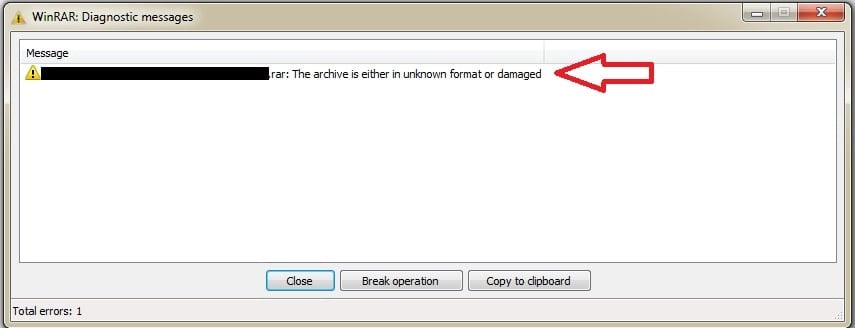
If you encounter this error, you need to make sure that your downloaded files are properly sized, and that the same name. (Only the last file is smaller in size)
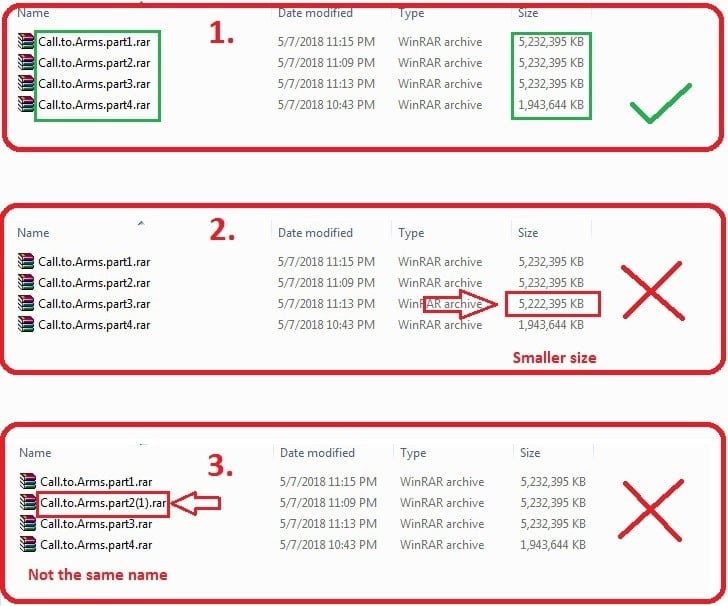
To solve this problem, you should re-download the file which is smaller in size and rename the file (if its name is different from the rest). Always be sure not to use too much bandwidth while downloading games, the downloaded file may be damaged if your internet connection is not good enough.


Marginal, I see some subreddit saying bad about us (I get information from my friends, remember that I never use reddit as well as have an account there). Some admins of the subreddit say that my website inserts the virus into the user's cookies (as mentioned above), I don't know why they don't have such knowledge but still be the admin of those pages, or maybe another plot. Oh, I've tried searching for information from a few admin, most of the admins of those subreddits are from Russia, and they are always giving priority to their Russian web sites. I'm not saying that the sites coming from Russia are bad, even I have a few good friends in Russia. I just want to say that these administrators are not good, somehow they will gradually remove other sites or try to spread bad rumors as much as possible to other sites. If someone left a bad comment about some of their *famous repacker*, or their website, they would quickly delete the comment, even if it had reached hundreds of likes. If you look carefully, you will realize this, I think I should call it is "subreddit Russian websites and friends". I don't care much about this, I just want to remind you, you should not be easily cheated.
1. You should download and install the latest versions of: Microsoft Visual C ++, Microsoft .NET Framework, OpenAL, Java, XNA Framework, … (Search on google and download them from the official sites)
2. You should install the latest drivers for your VGA, CPU,… You should download the “3DP Chip” (this is freeware), after installing it, it will help you to find the link to download the latest driver for your VGA, CPU, …
3. Update your Windows.
4. Restart your Windows.
5. Turn off Antivirus programs as well as Firewalls.
6. Extract / reinstall the game, run the game with “Run as Administrator”.
Hope these can help you, enjoy 😉
1. You should download and install the latest versions of: Microsoft Visual C ++, Microsoft .NET Framework, OpenAL, Java, XNA Framework, … (Search on google and download them from the official sites)
2. You should install the latest drivers for your VGA, CPU,… You should download the “3DP Chip” (this is freeware), after installing it, it will help you to find the link to download the latest driver for your VGA, CPU, …
3. Update your Windows.
4. Restart your Windows.
5. Turn off Antivirus programs as well as Firewalls.
6. Extract / reinstall the game, run the game with “Run as Administrator”.
Hope these can help you, enjoy 😉
1. You should download and install the latest versions of: Microsoft Visual C ++, Microsoft .NET Framework, OpenAL, Java, XNA Framework, … (Search on google and download them from the official sites)
2. You should install the latest drivers for your VGA, CPU,… You should download the “3DP Chip” (this is freeware), after installing it, it will help you to find the link to download the latest driver for your VGA, CPU, …
3. Update your Windows.
4. Restart your Windows.
5. Turn off Antivirus programs as well as Firewalls.
6. Extract / reinstall the game, run the game with “Run as Administrator” or you can even try with “Run in compatibility mode”.
7. Or maybe for some reason windows did not automatically select the primary graphics card to process the game, you can fix it, by going to Windows Settings->System->Screen->Graphics, the game application or launcher exe file (you can add it if it doesn’t exist), change it to the primary graphics card.
Hope these can help you, enjoy 😉
For errors that you can’t find in the F.A.Q section above, you can leave a comment to ask below. But please read the following RULES carefully, they will help others solve your problem more easily.

1. Please include the name and link of the game you downloaded.
2. Please include at least one screenshot of the error (if possible).
For example: “Hello, I just downloaded Grand Theft Auto V, https://igg-games.co/grand-theft-auto-v-free-download.html. I got the error “abcxyz” as follows… [image of the error]”
LIST CURRENT MODERATOR






They just do it because they want to help me, they don’t have any benefits. so please respect them.

